
Patriot Tech Services Inc. Blog
Patriot Tech Services Inc. has been serving the Wheelersburg area since 2006, providing IT Support such as technical helpdesk support, computer support, and consulting to small and medium-sized businesses.


With many—if not most—computers and especially laptops featuring integrated webcams at this point, it isn’t hard to imagine how disastrous it would be to be spied on through it. Let’s take a few moments and go over a few ways to be sure that your webcam isn’t being used without your consent by someone else.
0 Comments
Collaboration is something that no modern business can do without, which helps to explain why so many current applications feature it so heavily. Let’s focus on Google Drive and its multitude of collaborative capabilities that so many businesses are now making use of.
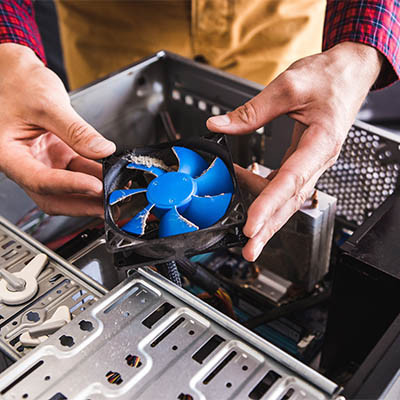
If you are like many other people, your desktop computer just sits there, day after day, allowing you to run your business. Unfortunately, like any other machine, it will fail. One way to prolong the lifespan of your computer is to keep it clean. Today, we thought we’d give you some pointers on how to do so.

A lot of businesses rely on Microsoft Word, the leading word processing app for companies, but the question is, are you using it to its fullest potential? Today, we thought we’d go through some of the features that can help you be more productive with Microsoft Word.

Every day, it seems like there’s a new threat to be concerned about. Obviously, there’s the big one that the whole world’s been dealing with, but there’s also the smaller things that we’re supposed to be worried about… like “blue light”, for example. What is that, and what can it really do?
As it turns out, blue light is more than just a marketing gimmick, and can potentially impact your health. Let’s go over a few tips to help you filter it out, and why you may want to do so.

Google Chrome is far and away from the most used Internet browser on both PC and mobile platforms, so it only makes sense to make using the Chrome browser as convenient as possible. Here’s a tip to help you simplify your Chrome browser tabs management.

While your attention is likely more dedicated to how you use your computer while it’s on, it is just as important to consider the different ways that you can turn your computer off, in a manner of speaking. The varied options present in the Start menu will each have their own effect, so it is important to be aware of what these differences are. Let’s review what each option does so that you’ll be able to use them more appropriately.

Gmail has proven to be as secure as most other email platforms, but email is email and there are times when you send an email that isn’t opened promptly and you’d rather not have the information in that message get sent around or archived where you can’t control it. Now Gmail has added a feature that allows users to send messages that will delete themselves in a predetermined time frame, and work to keep the contents of those messages from being shared. Let’s take a look at them today.

Gmail is as secure as any comparable email platform, but there may be some messages you send that you’d rather not have hanging around in someone’s inbox. However, did you know that Gmail enables you to send messages that delete themselves after a set timeframe… while also preventing the contents from being forwarded, downloaded, copied, or printed?

Android device users rely on the Google Play Store to source applications, but many may not be aware of the controls and features that the Play Store has to offer. Let’s go over some of these features that could prove useful.

Most businesses nowadays rely quite heavily on information technology to operate, as I’ve no doubt that you’re aware of. That’s why we thought it would be valuable to share some very simple IT best practices to help assist your operations by keeping your resources productive and secured.

2021 is almost here, and if your business isn’t using technology to its fullest capability, you’re missing out on some considerable opportunities. Let’s go over a few winning strategies that you should adopt in the coming year.

If it is going to remain the most common Internet browser, Google Chrome always needs to have new features added to it to make it the preferable choice for most users. Recently, Chrome Actions was implemented, likely contributing greatly to that goal. Let’s look at what Chrome Actions are, and how they could prove useful.
Microsoft Word has a lot of time-and-effort-saving capabilities baked in. For instance, did you know that you can paste the same text—down to the formatting—across numerous documents? This makes it simple to replicate text without having to fix it each time, and to make changes everywhere the text appears all at once. Let’s go over how to do so.

Windows 10 has long played nice with the Android platform, but did you know that there is a way that you can actually use the same apps you would find on your mobile device on your PC? For this week's tip, we'll go over how you can enable this capability.

As the business world remains restricted in their operations, costs have been a consideration that organizations need to put some serious thought into. Fortunately, there are many ways that you can invest in technologies that significantly benefit your business operations without breaking the bank. Let’s go over five ways to maximize your benefits, without maximizing your investments.

Considering how much as we rely on our mobile devices each day, it comes as no surprise how stressful the “LOW BATTERY” notification can be. While you might assume that it only seems to appear earlier and earlier in the day, there are in fact a variety of conditions that cause your device to die much faster. That’s why we wanted to share a few tips to help you understand what is happening to your battery, and what you can do to manage its longevity a little better.

As your employees go about their workdays, it is important that they do so with the resources they’ll need to remain optimally productive… and that these resources are in the best condition for them to do so. While this is often an overlooked consideration, this means that their computer needs to be clean and fully functional. Let’s go over a few best practices to follow when it comes to keeping a workstation clean enough to work optimally.

Chances are you’re still spending a lot of time at home, and a lot of that time is being spent on the Internet. With so many still working remotely, and many educational institutions continuing remote learning, the strength of a household’s Wi-Fi signal is going to be crucial. We wanted to offer you some tips to help you maximize the signal strength of your router.

When creating an office’s network, wireless functionality has become a necessary element to include. Of course, this is usually easier said than done, as wireless signals can be notoriously persnickety. That’s why we’re offering some tips to help you make the most of your business’ wireless network setup.
News & Updates
Businesses will often go into the process of self-improvement with unrealistic expectations for how much they can significantly improve their functionality. This simply is not true, and sometimes business owners need to realize that real change—the k...
Understanding IT
Get the Knowledge You Need to Make IT Decisions
Technology is constantly evolving, and keeping up can feel overwhelming. Whether you want to understand cybersecurity threats, explore automation, or learn how regulations like PCI DSS impact your business, we’ve made it easy to access clear, straightforward insights on key IT topics.
Contact Us
Learn more about what Patriot Tech Services Inc. can do for your business.
Patriot Tech Services Inc.
578 State Route 522
Wheelersburg, Ohio 45694